This article is part of a 27-article series on the AI Business Transformation Methodology. This piece is the centerpiece of the Level 3 series, covering the practical methodology for workflow redesign and the seven major pitfalls that derail most organizations.
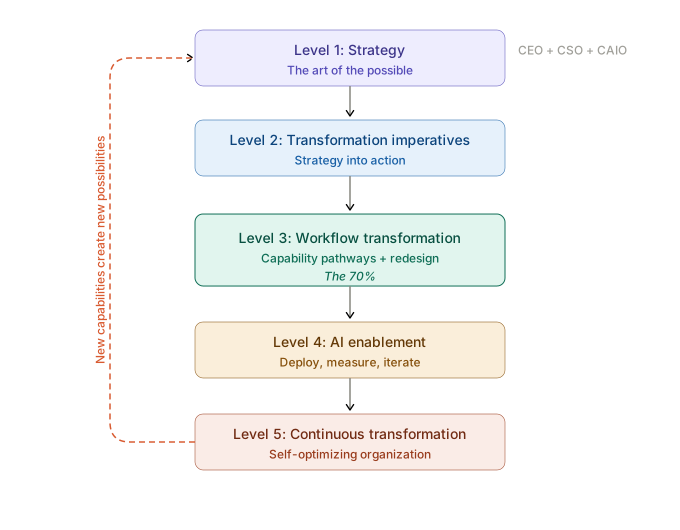
This is the 70%.
Everything in the methodology has been building to this moment. The strategy has been set. The imperatives have been defined and prioritized. The domain owner has received their charter. The capability decomposition has identified what the organization needs to be able to do. The education cascade has built AI fluency at every level of the team. Now comes the work that determines whether the AI investment produces enterprise-level transformation or another round of promising experiments that fail to compound.
McKinsey’s State of AI research tested 31 organizational variables to determine which had the strongest contribution to achieving meaningful business impact from AI. The answer was not the sophistication of the model, not the size of the data estate, and not the scale of the technology budget. It was workflow redesign.1 Among AI high performers, 55% report fundamentally reworking their processes when deploying AI, nearly three times the rate of other firms at roughly 20%.
The evidence has only strengthened since. BCG’s AI at Work 2026 survey of 11,749 workers across 14 markets, published June 3, 2026, quantified the redesign dividend directly: companies pursuing workflow redesign are 24 points more likely to see measurable business improvement from AI, 22 points more likely to save employees a full day per week, and 20 points more likely to report higher job satisfaction.4 The same study found that a clear AI strategy lifts measurable business impact by 25 points, while better tools alone lift it by roughly 5.4 The design of the work, not the sophistication of the tools, is where the value lives.
This article is written for two audiences. For directors and senior managers: you are the quality gatekeepers who determine whether the redesigned workflows coming out of your departments are genuinely transformative or trapped in old-technology thinking. This article gives you the framework for evaluating that quality. For the managers, senior analysts, and business process analysts doing the design work: this article gives you the practical methodology and, critically, the seven pitfalls that will derail your work if you do not see them coming.
Why is redesigning workflows for AI the opposite of past technology adoption?
Redesigning workflows for AI reverses the decades-old pattern of enterprise technology adoption: instead of buying software and reshaping your processes to fit it, you design the ideal workflow first and let AI serve it. For decades, you bought the software (SAP, Oracle, Salesforce) and then redesigned your processes to conform to how the software operates. The technology dictated the process. Entire consulting practices were built around this model. Business process reengineering in the ERP era meant mapping your operations to the system’s capabilities and constraints.
AI is fundamentally different. AI technologies are dramatically more flexible and adaptable than any previous generation of enterprise software. You are no longer constrained by rigid configurations that force a specific workflow. You can build and configure AI capabilities around your specific business needs. For the first time, the correct approach is to design how work should be done first, and then select technology that conforms to that design.
This is a complete inversion of what most teams have spent their careers doing. And it is why most organizations get workflow redesign wrong. The teams doing the work default to the model they know: start with the technology, figure out what it can do, and design processes around its capabilities. Deloitte calls this the “antipattern,“ a familiar but counterproductive approach that keeps organizations stuck in pilot mode. Their assessment is direct: AI amplifies the process it enters, but it does not fix a broken one. If you overlay AI onto an workflow not redesigned, you automate the inefficiency.2 If you redesign the workflow first, AI multiplies the value of the new design.
By mid-2026, this had become the consensus position of every major firm studying the question. Accenture’s June 2026 operations survey found that 86% of C-suite leaders plan to increase AI investment in 2026, yet only about 20% of organizations are rebuilding processes for AI and fewer than 1 in 10 are redesigning roles around it. Accenture’s diagnosis: productivity gains at the edge are appearing faster than the structural changes needed in core business processes.5 KPMG’s inaugural Global AI Pulse reached the same headline conclusion: value is created by organizations that redesign how work gets done, embedding AI and agentic systems into workflows, governance, and decision-making.6 IBM built its entire Think 2026 conference around an “AI Operating Model,” arguing that the missing piece is not technology but a governed system connecting agents, data, automation, and infrastructure.7 Gartner’s April 2026 study of AI projects in infrastructure and operations found that among organizations with at least one successful use case, the top-named success factor was integrating AI into existing workflows and systems.8 And Deloitte’s 2026 Global Human Capital Trends shows how few organizations have acted on the consensus: only 6% of leaders report progress designing human-AI interactions.9 The gap between what everyone now says and what almost no one has done is the opportunity.
The domain owner and their VPs must set this expectation explicitly from the outset: we are designing how work should be done, unconstrained by current technology. The technology selection comes later, at Level 4, when the redesigned workflows define exactly what the technology needs to enable.
Who is responsible for quality in workflow redesign?
Quality in workflow redesign is a shared chain: analysts and managers do the design work, directors and senior managers review it, and domain owners and VPs evaluate whether it reflects AI’s full potential — clarifying who does what prevents either micromanagement from above or unreviewed work from below. Understanding this chain is essential before discussing the methodology itself.
Directors and senior managers are the critical quality filter. They do not design the workflows themselves. They are accountable for ensuring that the workflow redesigns coming out of their departments are transformative rather than incremental. They sit in a unique position in the organization: close enough to the operational reality and the technology to evaluate quality, and senior enough to understand the domain, the industry, and what is strategically possible with AI. Their job is to review proposed designs with enough depth to determine whether the design reflects the full potential of what AI makes possible.
This is where the biggest opportunity and the biggest risk both live. If directors and senior managers delegate too far down the chain without staying involved enough to evaluate quality, they risk having teams produce workflow designs that are incremental improvements on legacy processes rather than genuine transformations. The director or senior manager who invested in understanding what AI makes possible during the education cascade (Article 11) can look at a proposed workflow design and immediately recognize whether it is bold enough or whether it is a 2015 process with an AI tool bolted on.
Managers oversee the execution. They manage the teams doing the design work, they QA the output for quality and completeness, and they report upward to directors and senior managers on progress, issues, and decisions needed. They need to be trained enough to ensure day-to-day quality, but they look to the directors and senior managers above them for the vision of what “good“ looks like.
Senior analysts and business process analysts do the actual workflow redesign work. They map current state, design future state, document the new workflows, and iterate based on feedback from managers and directors above them. They are the hands on the design, and the quality of their work depends directly on the quality of the education they received in Phase 3B.
The quality gate works like this: analysts produce a design, managers QA it, directors and senior managers evaluate it against their understanding of what AI makes possible, and only after that review does the design move up to the VP level for approval. At every stage, the reviewer has at least as much AI fluency as the person who produced the work.
What is the step-by-step methodology for redesigning a workflow?
For the teams doing the design work, the methodology follows six steps. Each step builds on the previous one, and skipping steps produces the pitfalls described in the next section.
Step 1: Map the current state with brutal honesty. Document how the work actually happens today. Not what the process documentation says, not what the last consulting engagement mapped, but what people actually do. This includes every undocumented judgment call, every workaround, every exception that experienced employees handle intuitively, every informal handoff that happens between systems or teams. Tacit knowledge, the understanding that lives in people’s heads rather than in any system, is the most valuable input to the redesign process. Interview the people who do the work. Shadow them. Ask them what they do when the standard process does not apply, because that is where most of the real operational intelligence lives.
Step 2: Identify decision points, exceptions, handoffs, and data flows. Within the current-state map, mark every point where a decision is made, an exception is handled, information is passed between people or systems, and data is created, consumed, or transformed. These are the points where the redesign will make its most consequential choices about what AI does, what humans do, and how they interact.
Step 3: Determine what should be substituted, augmented, or transformed. For each activity in the workflow, the design team assesses three possibilities. Substitution means AI performs the activity instead of a human. Augmentation means AI assists the human in performing the activity (providing recommendations, surfacing relevant information, drafting initial outputs for human review). Transformation means the activity itself changes because of AI: it may merge with other activities, split into different activities, or be replaced by an entirely new activity that was not possible before AI. The most transformative redesigns have a high proportion of transformed activities, not just substituted ones.
Step 4: Design the future state with human-AI collaboration patterns. The redesigned workflow should specify, at each step, who or what is performing the work, what the handoff between human and AI looks like, what triggers human intervention, what quality checks are built in, and what data flows between steps. Each AI-enabled step should also carry the governance classification from the framework Article 7 established, specifying what the AI is authorized to do, what quality level it must achieve, and what level of human oversight applies. These classifications become the monitoring baseline when the workflow is deployed at Level 4: the standard against which the CIO’s team measures whether the AI is operating within the boundaries the domain’s leadership approved. The design must define what humans do with the same specificity as what AI does. A workflow that only specifies the AI components and leaves the human role vague will fail in practice because people will not know what is expected of them.
As part of the future-state design, each step that involves an AI capability should be tagged with the capability category that enables it — not a specific product or vendor, but a category from the taxonomy maintained by the CAIO’s AI Technology Strategists (described in Article 5). This tagging creates a capability dependency map layered on top of the workflow design. It serves two purposes. First, it ensures the design team is thinking about what type of AI capability each step requires, which sharpens the technology selection conversation at Level 4. Second, and more importantly, it enables rapid impact assessment when AI capabilities evolve. When the AI Technology Strategists identify a significant new capability through their continuous horizon scanning, they can cross-reference it against the tagged designs across all departments and immediately identify which specific workflow steps are affected — rather than requiring a wholesale review of every design. This tagging is a design practice, not a separate exercise. It takes minutes per step and becomes part of the deliverable that moves through the quality gate.
Step 5: Document data requirements and flag constraints. For each step in the redesigned workflow, identify what data is needed, where it comes from, whether it is available and clean enough, and who owns it. The data identification should cover both structured data (transaction records, customer identifiers, inventory levels) and unstructured data (contracts, emails, support transcripts, technical documentation, images) that the AI-enabled step requires. AI systems consume unstructured data alongside structured data in ways that no previous enterprise technology has required, and workflow designs that document only structured data requirements will leave the CIO and CDO’s team at Level 4 with an incomplete specification. For both structured and unstructured data sources, the redesign team should also document the business context the AI needs to interpret the data correctly: what business entities are involved at each workflow step, how those entities relate to each other, what business rules govern them, and where the same entity may appear under different names or identifiers across the systems the workflow touches. For unstructured sources specifically, the team should identify what business meaning is embedded within the documents, including the parties, terms, relationships, and classifications that the AI must extract and understand to perform its role in the workflow. AI systems cannot infer this context independently the way a human employee does when reading a contract or reviewing a support transcript. This business context specification becomes the requirement that the CDO’s organization uses at Level 4 to build the semantic infrastructure that makes the enterprise’s data self-describing for AI consumption. When the design requires data that does not exist or is not accessible, flag it immediately. Do not design a workflow that assumes data you do not have. Do not limit your design to legacy data structures when better architecture is achievable. Article 13 in this series covers data readiness as a practical constraint in greater depth.
Step 6: Coordinate with upstream and downstream departments. No workflow operates in isolation. The output of one workflow is the input to another. When multiple departments are redesigning simultaneously, the handoffs between them must be coordinated. The redesigned accounts payable workflow must connect to the redesigned procurement workflow and the redesigned general ledger process. If each department designs in isolation, the integration points break. Article 14 covers cross-department coordination in detail.
What are the most common ways workflow redesign fails?
Workflow redesign is derailed most frequently by seven recurring failure modes, each documented by implementation firms that do this work at scale and by the research that studies it. Directors and senior managers should know these well enough to recognize them in their teams’ work. Analysts and managers should know them well enough to avoid them.
What is the antipattern in AI workflow redesign?
The antipattern is the most common failure mode: taking the existing workflow and simply adding AI to it. The current process stays largely the same, with an AI tool inserted at one or two points to speed up specific tasks. This is what Deloitte calls the antipattern. It feels like progress because something changed. But the fundamental workflow, with all its inefficiencies, redundancies, and legacy constraints, remains intact. The AI accelerates an inefficient process, which means you reach the wrong outcome faster.2
The antidote: start the design from the business outcome, not from the current process. Ask “how should this work be done to achieve the best possible outcome?“ rather than “where can we add AI to how we do it today?“
What is the data fragmentation pitfall?
Data fragmentation is the pitfall where a redesigned workflow assumes seamless access to data that, in reality, lives in disconnected systems. The redesign team designs a workflow that requires real-time access to customer data, transaction history, and risk profiles from four different systems. In the design, this data flows seamlessly. In reality, those systems do not talk to each other, the data formats are inconsistent, and no one has established governance over who owns what.
The antidote: treat data as a practical constraint from the beginning of the design process. Map data requirements in Step 5 and flag gaps immediately. Do not design a workflow that assumes data integration you do not have. Either scope the design to what the current data environment supports (with a plan to expand later) or include a data readiness workstream as a prerequisite.
What is the tacit knowledge loss pitfall?
Tacit knowledge loss is the pitfall where the redesign team maps the current process from documentation and system flows but never interviews the experienced employees who actually do the work. The redesigned workflow misses the 40 judgment calls per day that experienced underwriters make, the informal escalation path that the customer service team uses for high-value clients, and the exception-handling process that exists only in the heads of three people in the department.
The antidote: Step 1 of the methodology. Interview the people who do the work. Shadow them. Capture every undocumented decision, workaround, and exception. This tacit knowledge does not just inform the redesign. It determines whether the redesigned workflow can actually function in the real operational environment.
What does under-designing and over-designing a workflow look like?
Under-designing happens when the team does not understand what AI can do, so they design workflows that barely use it. The AI handles one small task while humans do everything else the same way they always have. The result is a marginal improvement that does not justify the investment.
Over-designing happens when the team overestimates what AI can do reliably, designing workflows where AI makes complex judgment calls, handles ambiguous situations, or operates without human oversight in contexts where it is not yet reliable enough to do so. The result is a workflow that fails in production.
The antidote: this is exactly why the education cascade (Article 11) precedes the design work, and why directors and senior managers serve as quality gatekeepers. The education gives the design team realistic fluency about what AI can and cannot do. The quality gate catches designs that have drifted too far in either direction.
Why is designing workflows in silos a problem?
Designing in silos is the pitfall where teams redesign their own workflows without coordinating, so the handoffs between them break on deployment. The finance team redesigns their invoice processing workflow. The procurement team redesigns their purchase order workflow. Neither team talks to the other. When both workflows are deployed, the handoff between procurement and finance breaks because the output format of the new procurement workflow does not match the input requirements of the new finance workflow.
The antidote: Step 6 of the methodology. Identify upstream and downstream dependencies at the beginning of the design work, not at the end. Schedule coordination sessions with adjacent departments. The CAIO’s department often serves as connective tissue across domains, ensuring consistency at integration points.
Why must the human role be defined as precisely as the AI’s?
Neglecting the human role definition is the pitfall where a workflow specifies exactly what the AI does but leaves the human’s job vague. The redesigned workflow specifies in detail what AI does at each step: the AI analyzes the document, the AI generates the recommendation, the AI routes the request. But it does not specify with the same precision what the human does: what they review, what criteria they use, what their authority is, when they override the AI, and what they are accountable for.
The result is a workflow where the technology works but the people operating it do not know their role. They either duplicate the AI’s work (because they do not trust it) or defer to the AI entirely (because they assume it is always right). Both produce worse outcomes than a well-designed human-AI collaboration where each party’s role is explicit.
The antidote: Step 4 of the methodology. Define the human role with the same specificity as the AI role. For every step where AI acts, specify what the human does: reviews, approves, overrides, escalates, monitors, or validates. Accenture’s research reinforces this, noting that achieving value at scale requires putting people at the center of the reinvention3, not treating them as an afterthought.
Why do you need an iteration plan for a new workflow?
Having no iteration plan is the pitfall where a workflow is deployed as if it were the final state, so predictable friction gets treated as failure. The team designs the workflow, it gets approved, and it is deployed as final. When the inevitable friction appears (the AI handles 85% of cases well but struggles with the other 15%, the handoff between human and AI needs adjustment, the data quality is worse than expected in certain scenarios), the organization treats it as a failure rather than as planned learning.
The result is either organizational confidence collapses (“AI does not work for us“) or the team scrambles to fix problems reactively rather than improving systematically.
The antidote: build the iteration plan into the design from the beginning. The first deployment is Version 1.0, not the final state. Define what you expect to learn from the first cycle. Establish metrics for how the workflow is performing. Plan the second iteration before the first one deploys. Communicate to everyone involved that first-cycle friction is expected, budgeted for, and a sign that the process is working as designed.
Why is iteration planned rather than a sign of failure?
Iteration is planned learning, not failure — a point that deserves emphasis beyond the pitfall list because it shapes how directors and senior managers lead their teams through deployment.
Teams that have never worked in AI-enabled workflows will encounter gaps between the design and reality. Some of those gaps will be significant. Handoffs between humans and AI agents will need tuning. Edge cases the design did not anticipate will surface. The AI’s performance on certain task types will differ from what the education engagements suggested. These are not design failures. They are the inherent reality of deploying new ways of working in complex operational environments.
The director or senior manager who communicates this framing to their team before deployment shapes how the entire organization experiences the transition. If first-cycle friction is framed as failure, people lose confidence and revert to old ways of working. If first-cycle friction is framed as learning, people engage with the problems constructively and contribute to solving them.
Plan two to three iteration cycles in the first six months after deployment. Budget time and resources for them. Measure specific metrics (processing time, error rates, human override frequency, customer satisfaction, employee experience) that tell you where the workflow is performing well and where it needs adjustment. Use those metrics to guide the second iteration. Each cycle builds organizational muscle that makes the next cycle faster and more effective.
The organizations that treat workflow redesign as a continuous improvement discipline rather than a one-time project are the organizations that achieve the compounding returns described in Article 2. Each iteration makes the workflow better. Each improvement in the workflow captures more value from the AI capability underneath it. The gap between these organizations and those that deployed once and moved on widens with every cycle.
Sources
- 1.McKinsey, “The State of AI in 2025,“ November 2025 (1,993 participants; 31 organizational variables tested). Workflow redesign single largest predictor; high performers 55% vs ~20% others https://www.mckinsey.com/capabilities/quantumblack/our-insights/the-state-of-ai
- 2.Deloitte, “Work Redesign Essential to Realize AI Return on Investment,“ October 2025. “Antipattern“: AI amplifies the process it enters but does not fix a broken one https://www.deloitte.com/us/en/about/press-room/work-design-essential-to-ai-roi.html
- 3.Accenture — enterprise AI implementation research on human-centered reinvention and putting people at the center of AI-enabled transformation.
- 4.BCG, “AI at Work: Why Strategy Matters More Than Tools” (4th annual edition), June 3, 2026 (11,749 workers, 14 markets). Workflow-redesign dividend: +24 points measurable business improvement, +22 points full-day weekly time savings, +20 points job satisfaction; clear strategy lifts impact 25 points versus roughly 5 for better tools alone https://www.bcg.com/publications/2026/ai-at-work-why-strategy-matters-more-than-tools
- 5.Accenture operations survey, reported by Forbes (Moor Insights), “Accenture Survey Finds AI Investment Surging, But Operating Models Lag,” June 24, 2026. 86% plan to increase AI investment; only 32% report sustained enterprise-wide impact; about 20% rebuilding processes; fewer than 1 in 10 redesigning roles https://www.forbes.com/sites/moorinsights/2026/06/24/accenture-survey-finds-ai-investment-surging-but-operating-models-lag/
- 6.KPMG, “Global AI Pulse, Q1 2026” (inaugural global edition), April 2026 (2,100+ senior leaders, 20 countries). Value is created by organizations that redesign how work gets done, embedding AI and agentic systems into workflows, governance, and decision-making https://kpmg.com/in/en/insights/2026/04/ai-pulse-q1-2026.html
- 7.IBM, announcements at Think 2026, May 4-7, 2026; Bain & Company, “IBM Think 2026: From AI Pilots to an Operating Model,” May 2026. The “AI Operating Model”: agents, data, automation, and hybrid infrastructure connected in one governed system https://www.ibm.com/new/announcements/ibm-announcements-at-think-2026
- 8.Gartner, “AI Projects in Infrastructure and Operations Stall Ahead of Meaningful ROI Returns,” April 7, 2026 (782 infrastructure and operations leaders). Workflow integration named top success factor among organizations with at least one successful AI use case; 28% of AI use cases fully succeed and meet ROI expectations; 20% fail outright https://www.gartner.com/en/newsroom/press-releases/2026-04-07-gartner-says-artificial-intelligence-projects-in-infrastructure-and-operations-stall-ahead-of-meaningful-roi-returns
- 9.Deloitte, “2026 Global Human Capital Trends: From Tensions to Tipping Points,” March 4, 2026 (9,000+ business and HR leaders, 89 countries). Only 6% of leaders report progress designing human-AI interactions https://www.deloitte.com/us/en/insights/topics/talent/human-capital-trends.html
Frequently Asked Questions
How long does the workflow redesign phase take for a typical domain?
It depends on the scope of the imperative and the complexity of the domain, but a realistic timeline for a well-scoped transformation is twelve weeks of active design work, followed by two to three iteration cycles over the first six months after deployment. Rushing the design phase below twelve weeks typically produces designs that miss critical tacit knowledge or skip the cross-department coordination step. Extending it too far beyond twelve weeks risks losing momentum and organizational attention.
What if our directors and senior managers do not have enough AI fluency to serve as quality gatekeepers?
Go back to Article 11. The education cascade must precede the design work, and the quality gate only functions if the people at the gate have the fluency to evaluate what passes through it. If the directors and senior managers did not go through a substantive education engagement, or if the engagement did not produce the operational fluency needed to evaluate designs, additional education is needed before the design work proceeds. This feels like a delay. It prevents a much more expensive rework later.
Should we use external consultants for the workflow redesign?
External expertise from implementation firms can be valuable for methodology, cross-industry pattern recognition, and capacity. But the domain knowledge must come from your people. External consultants do not know your business the way your experienced employees do. The most effective model is external methodology and facilitation combined with internal domain expertise and design ownership. The worst model is outsourcing the entire redesign to consultants who then produce workflows that your people do not understand, do not trust, and do not adopt. If you decide to bring on external consultants for this function, vet everyone to ensure they have the relevant domain experience in addition to workflow redesign experience required to be a valuable contributor.
How do we know when a workflow redesign is ready to deploy?
A redesigned workflow is ready for deployment when it meets four criteria: the design has been reviewed and approved through the quality gate (managers, directors, VPs), the human roles are defined with the same specificity as the AI roles, the data requirements have been validated as achievable, and the iteration plan for Version 2.0 is already in place. Perfection is not the standard. Completeness, quality review, and a planned path to improvement are the standards.
This series addresses “what” to do, not “how” to do it. If you are a business executive and would like help thinking through the “how,” please feel comfortable reaching out.

About the author
Shawn Plaster
Founder & CEO, Plaster Group
Shawn is the author of Plaster Group's five-level AI Business Transformation Methodology and its 27-article Insights series, and leads the firm's enterprise AI transformation work.
Previous: Article 11: The Education Cascade · Next: Article 13: Data Readiness as a Practical Constraint
© 2026 Plaster Group, LLC. All rights reserved. This article may not be reproduced, distributed, or transmitted in any form without prior written permission from Plaster Group. Brief excerpts may be quoted for review or commentary purposes with attribution to the author and a link to the original article.
Ready to move forward?
Let's discuss how your organization can build with AI — securely, strategically, and starting from where you are today.
Start a Conversation